Nondominium UI Design Vision
MVP
This section describes the minimalistic UI for MVP Layer 0 — NDO Identity (stable anchor; only lifecycle_stage evolves after creation; REQ-NDO-L0-*). The MVP UI implements the concepts of Lobby, Groups, and NDO view.
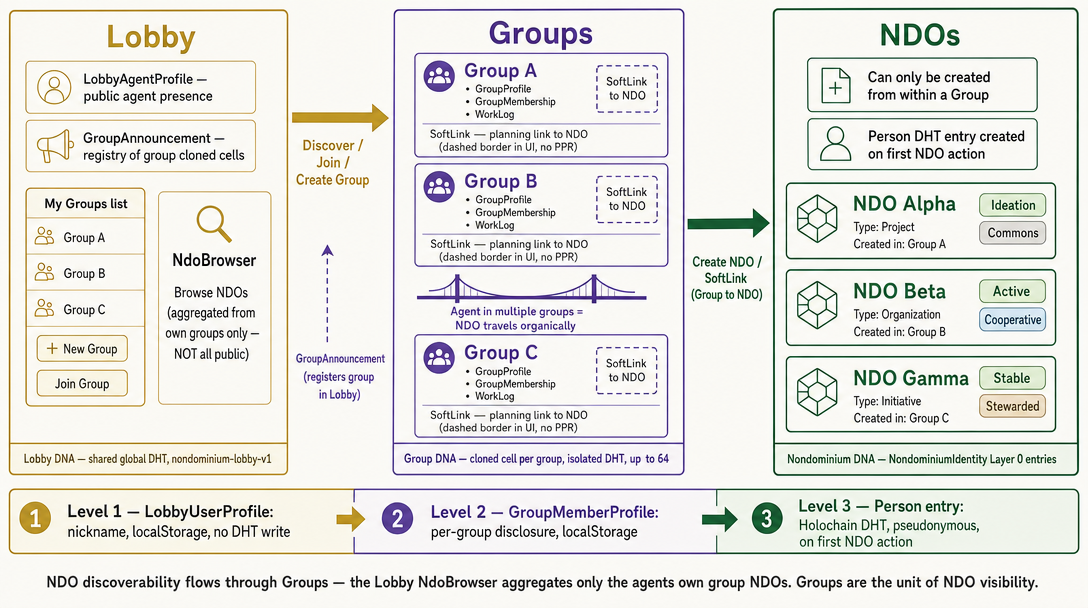
Lobby discovers Groups (via GroupAnnouncement in the shared Lobby DHT) — not NDOs. Groups discover NDOs via NdoAnchor entries in each Group's own cloned-cell DHT, and each NDO is itself a cloned ndo cell (ADR-010 model A). The Lobby's NdoBrowser shows only NDOs from the agent's own groups, not a global public registry. NDOs can only be created from within a Group. Identity: localStorage nickname → per-group profile → Person DHT entry on first NDO action.
Lobby
The Lobby is a permissionless digital environment that anyone can join. It is the persistent outer shell of the application, always visible regardless of which route is active.
Implemented:
- Persistent left sidebar present on all routes, containing:
- Browse NDOs link → root page (
/) listing all unique NDOs across all the user's groups, with filter chips (Lifecycle Stage, Resource Nature, Property Regime) - Groups list — links to each group the user has created or joined (
/group/:id) - + New Group — inline form: user enters a group name and confirms; they become the group creator
- → Join Group — inline form: user pastes an invite code or link
- My Profile / Edit profile — at the bottom of the sidebar; opens the profile modal
- Browse NDOs link → root page (
- First-time profile modal — triggered automatically on first app launch when no lobby profile exists; requires at least a nickname; all other fields (real name, bio, email) are optional and stored in
localStorage
Groups
Groups are organizational contexts for NDOs. A user can create a solo Group or join an existing one. Groups are DNA-backed: each group is a cloned Group DNA cell (clone_cell, zome_group) with its own isolated DHT, announced for discovery via the Lobby DNA. Only the Level 2 presentation choice (GroupMemberProfile — anonymous vs. selected fields) remains in localStorage; membership and NDO associations live on the DHT (GroupMembership and NdoAnchor entries).
Implemented:
- Group panel (
/group/:id): shows group name, list of NDO cards, member list, and a "Create NDO" button - Group profile prompt: on first visit to a group the user is asked how they wish to present themselves (anonymous / custom); stored in
localStorage - NDO cards in group: each card shows name, lifecycle-stage badge, property-regime badge, resource-nature badge, and description excerpt; clicking a card navigates to the NDO detail page
- Switching groups: navigating from one group to another correctly reloads the group name and NDO list
- Invite links (multi-member groups):
generateInviteLinkencodes{ network_seed, group_dna_hash, group_name }as?group=<base64>; Sidebar and GroupView expose "Copy invite";joinGroupprovisions the clone cell and callsjoin_group - Group members from DHT:
MemberListis wired togroupService.getMembers(cellId)on the group clone cell (each member is the action author of aGroupMembershipentry linked from the group hash) - Reactive join: a joined group appears in the sidebar immediately.
joinGrouppollsget_my_group(fetchGroupProfileWithRetry) to absorb DHT gossip latency, and falls back to an invite-payloadGroupDescriptorif the profile has not yet synced, so no page reload is needed.TODO(signals): replace polling with a Holochain remote signal once available. - Membership self-heal: because
joinGroup's membership commit is best-effort (it can take the payload-fallback path before the group profile gossips, and thejoin_groupcall is non-fatal), opening a group runs an idempotentlobbyService.ensureMembership(groupId)(resolve group hash →is_member→join_groupif missing). This guarantees a joined agent is eventually a committed member and appears in everyone's member list, even if the original join missed. - Pull-based reactivity for shared items: while a group is open,
GroupViewsilently re-fetches it (members + NDOs viagroupStore.refreshCurrentGroup()) on tab focus / visibility change and on a gentle ~8s poll (paused when the tab is hidden). New items gossiped from other members therefore surface without a manual reload.TODO(signals): replace this pull layer with Holochain remote signals (focus/poll kept only as an offline/missed-signal fallback).
Not yet implemented:
- Group-level governance
- Push-based reactivity via Holochain signals (currently pull-based: focus + poll + per-open reconciliation). Cross-member changes appear within the poll interval / on focus / on reload rather than instantly.
NDO Creation
NDOs can only be created from within a Group. The "Create NDO" button in a Group panel opens a creation form. NDO identity data is stored on the Holochain DHT as a NondominiumIdentity (Layer 0) entry; the action_hash of that entry is the NDO's permanent stable identity.
Implemented fields:
| Field | Control | Notes |
|---|---|---|
name | text input | required; uniqueness warning shown if name already exists in the lobby |
property_regime | select | 7 variants: Private, Commons, Collective, Pool, CommonPool, Public, Nondominium; tooltip per option |
resource_nature | select | 5 variants: Physical, Digital, Service, Hybrid, Information; tooltip per option |
lifecycle_stage | select | seven creatable-at-registration stages: Ideation, Specification, Development, Prototype, Stable, Distributed, Active (matches create_ndo validation); Hibernating and terminal stages (Deprecated, EndOfLife) are not selectable here — only via lifecycle transitions after registration |
description | textarea | optional |
Note: PropertyRegime is protocol-canonical at seven variants (including Collective, Pool, and Public). The UI creation form, filters, and badges expose all seven. See the Rust
PropertyRegimeenum incrates/shared/src/types.rsandLifecycleStagefor current canonical values.
NDO View
Clicking an NDO card navigates to /ndo/:hash.
Implemented:
- NDO name displayed in header (populated immediately from in-memory cache on card click; refreshed from DHT in the background)
- Truncated hash shown below the name
- Detail card: labeled fields for Description, Property Regime, Resource Nature, Lifecycle Stage, and Created date
- Identity badges: lifecycle-stage color badge, property-regime badge, resource-nature badge
- Lifecycle transition button (visible to NDO initiator only): advances the lifecycle stage
- Join NDO button — placeholder; toggles inline "Coming soon"; no backend call yet
- Associate with a group button — always shown in the header; opens a modal that lists groups the user has created or joined that are not already linked to this NDO (multi-select); if the user has no groups, the modal explains that case; confirming writes associations to
localStorage(ndo_groups_v1keyed like other group data — seegroup.store.svelte.ts); the NDO card then appears in the selected group(s) - Fork this NDO button — opens the fork friction modal; visible only when the Holochain conductor is connected and the UI has resolved the user's agent key
- Tabs: Resources, Governance, Composition, Activity (stubs for post-MVP content)
Browse NDOs
Implemented:
- "Browse NDOs" in sidebar → root page showing all unique NDOs from all groups the user has created or joined
- Filter chips by Lifecycle Stage, Resource Nature, and Property Regime (7 variants)
- NDO cards with name, badges, description excerpt, and truncated hash
- "No NDOs yet" state when the user has no groups or no NDOs
User / Agent Identity
At the Lobby level the User can be anyone. At this level the User creates a Lobby Profile, stored in localStorage. At the Group level the User also has a profile, linked to the Lobby profile but customizable per group. As the User creates or links to an NDO, their identity is distilled into a Holochain Agent (as implemented in zome_person). Since NDOs are public and permissionless, no personal information is revealed at the NDO level — only a pseudonymous agent key address is shown. Access to personal data (e.g. PPR — Personal Participation Receipts) is selective and governed by the Governance zome.
Implemented:
- First-time Lobby profile modal:
nicknamerequired;realName,bio,emailoptional; stored inlocalStorage - "Edit profile" in sidebar for returning users
- Group profile prompt on first group visit: user can choose how to present themselves (anonymous or with selected fields from their Lobby profile)
- Agent public key shown on the NDO initiator line when Holochain is connected
MVP ToDos
Status (2026-06): All eight MVP ToDos below are implemented. Groups are DNA-backed via cloned Group cells (
clone_cell,zome_group); NDO lists useNdoAnchorentries on the group DHT (per-NDO cells, ADR-010/011 — seedocumentation/specifications/adr/ADR-010-013-per-ndo-cells.md). Join NDO is UI + API contract only (backend stub).
-
Multi-member groups — invite link✅generateInviteLinkencodes{network_seed, group_dna_hash, group_name}; Sidebar and GroupView expose copy-invite;joinGroupprovisions clone cell and callsjoin_group. -
NDO fork friction✅ForkNdoModal.sveltedisplays negotiation → consensus → Unyt stake notice before copy-pubkey CTA. -
NDO detail page — DHT refresh reliability✅/ndo/[hash]callsresource.getNdo(hash)directly viagetNdoDescriptorForSpecActionHash; cache is fallback only. -
Group member list✅MemberListwired togroupService.getMembers(cellId)from group clone cell. -
Browse NDOs onboarding✅NdoBrowserempty state distinguishes no-groups vs no-NDOs with create/join CTAs. -
Update✅ Three-tier identity model documented (§2.0); Level 2 profiles remain localStorage; groups are DHT-backed.agent.md -
NDO–Group association DHT propagation✅create_ndo_anchoron the group cell; lobby/group NDO lists resolve fromNdoAnchors. (Originally shipped ascreate_soft_link; superseded by anchors when NDOs moved to their own cells.) -
Join NDO✅ UI flow inNdoView.svelte; API contract indocumentation/zomes/resource_zome.md § NDO membership (planned);joinNdo/getNdoMembersstub inndo.service.ts.
Perspectives (Next)
A Perspective is a lens on the DHT data. Each Perspective answers one question, "what is the Agent doing?", and is built around one base primitive. Navigation means "swimming in the ocean" of that primitive, then adding layers progressively (e.g. from a resource: which communities use it → which are local → who uses it → which organization owns it). The Agent is always in exactly one Perspective and can jump between them (see Cross-Perspective Navigation). There are four Perspectives:
| Perspective | Question it answers | Base primitive |
|---|---|---|
| 📦 Resource | What can I use, borrow, offer or manage? | Resource (NDO) |
| 👥 Agent | Who can I connect or collaborate with? | Agent (incl. Groups) |
| 🧭 Intelligence | Where should I allocate my time and resources strategically? | Projects and organizations, incl. those outside the Agent's current sphere |
| 🛠️ Work | What do I engage in today, and with whom? | Process / work item, in the context of a resource, project or group |
📦 Resource Perspective
Resource-centric view of the DHT.
- Use cases: find a resource to use or borrow; offer a resource (by creating a new NDO); manage resources the Agent owns, custodies or maintains.
- Progressive layers: communities using the resource → which are local (map tool) → who uses it → which organization owns it.
- Sources: included to the extent a Resource is linked to a Source (e.g. a gallon of water from a river). A Source view presents the Source as a shared surface (a "digital twin" of, say, a river) to which data is attached (scientific studies, flow, planned withdrawals), so that all parties see the same information and rules of use can emerge from it. See
post-mvp/source-ndo-requirements.md. - Expanded resource view: shows linked Agents and their capacity (e.g. Custodian, Repair agent). Clicking one jumps to the Agent Perspective.
resource_view:
  focus_filter: resource_type | nature | regime | lifecycle_stage
  group_by: category | status | source
  layers: [communities, local_map, users, owner_org]
  layout: cluster_hierarchy
👥 Agent Perspective
Agent-centric view of the DHT. Groups are a type of Agent and appear in results.
- Use cases: find Agents by skills; invite Agents to collaborate on a project; discover Groups and decide to join them.
- Profile: communities, projects, skills and reputation in one view.
- Navigation: hop from link to link through the relationship graph (collaborations, shared groups, roles on resources).
- Tools: map (e.g. world distribution of a skill); chat to contact an Agent directly (possibly through the Capability Surface).
agent_view:
  focus_filter: skills | collaboration_potential | group_membership
  relationship_mapping: trust_network
  layout: network_graph
🧭 Intelligence Perspective (formerly Role Perspective)
Strategic decision-support view. Helps the Agent decide where to allocate time and resources. Unlike the Work Perspective, it gathers information from outside the Agent's current sphere of activity, and doubles as a personal dashboard.
- Personalised filtering: by the Agent's role, skills, reputation (PPR) and past interactions.
- Navigable contexts: Groups, project-type NDOs and other collaboration contexts, including ones the Agent has not joined.
- AI assistant (MCP): an agent that knows the Agent's profile, exposed through an MCP server, suggests fitting projects (e.g. already-funded projects if income is needed; high-potential, no-revenue projects if the Agent wants to give 5–10% of their time to them).
- Stage-aware assessment: expected benefit and impact are weighed by project stage (early, in development, near completion), mapped from
lifecycle_stage. - Project-declared benefits: assessments rely on the benefits a project publishes itself. These are declared in the project-type NDO specification (
post-mvp/project-type-ndo-specifications.md), which therefore needs a benefits field. - Time-allocation simulation: e.g. "10% on high-impact projects, 10% on social impact, the rest on revenue-generating ones" → the assistant shows matching opportunities. Other simulations (benefit-redistribution algorithms) and the map are also invocable.
- Direct actions: subscribe to a community, become a member, attach to a project.
intelligence_view:
  focus_filter: role_fit | skills_match | reputation | past_interactions
  scope: outside_current_activity
  assistant: mcp_agent
  tools: [allocation_simulation, redistribution_simulation, map, chat]
  layout: ranked_opportunities
🛠️ Work Perspective (new)
Process-centric view of the Agent's active engagements. "Work" means engaging in processes, in the context of a resource, project or group ("what can I do in this group today?").
- Project list: all project-type NDOs the Agent has subscribed to or contributed to. Selecting one opens its collaboration tools. Group- and resource-level contexts are also available.
- Per-project tools: kanban board, tasks, planning; commit to work, take a task, log contributions; coordinate with other Agents on the development of the NDO.
- Stigmergic signals across projects: which projects are active or need attention, invitations to contribute, calls for decision-making. These help the Agent choose what to work on today.
- Joining: a project joined from the Intelligence Perspective lands here. In the Work perspective, also provide access to the 3 layers of Valueflow layers (knowledge, plan and observation).
work_view:
  focus_filter: subscribed | contributed
  contexts: [project, group, resource]
  panels: [project_list, kanban, planning, contributions, signals]
  priority_order: attention_needed | invitations | activity
  layout: project_workspace
🧰 Tools (cross-perspective)
Tools are not Perspectives; they can be invoked from any Perspective and applied to that Perspective's data.
- Geographic map: maps Resources, Agents, Groups or Projects, depending on where it is opened.
- Chat: direct contact with an Agent, available in several Perspectives.
- Others: simulations, kanban (Work), filters and search.
Cross-Perspective Navigation
Perspectives are connected by contextual jumps carrying the current entity (resource, agent, project, group) along.
| From | Trigger | To |
|---|---|---|
| Work | "Discover new projects" action | Intelligence |
| Intelligence | Join a discovered project | Work (project opens in context) |
| Resource | Click a linked Agent (Custodian, Repair agent, ...) in the expanded resource view | Agent (that Agent's profile and connections) |
| Agent | Click a resource linked to the Agent | Resource |
| Agent / Intelligence | Join a discovered Group | Work or Group panel |
Return path: every jump pushes an entry on a navigation trail (breadcrumb across Perspectives, e.g. Resource: Drill press → Agent: Alice → Groups). A persistent "Back to
Perspective switcher: always visible; besides switching manually, the UI offers contextual hints (a button or badge) when another Perspective is relevant to the current task.
Perspectives ToDos
Status: imminent work (next after the MVP ToDos above). Start with the navigation skeleton, then fill each Perspective incrementally; Perspectives that depend on missing backend data ship first as thin, filtered views over existing Lobby / Group / NDO data.
- Perspective switcher — persistent shell control (Resource · Agent · Intelligence · Work) and one route per Perspective; the current Browse NDOs page becomes the seed of the Resource Perspective.
- Navigation trail — cross-Perspective history stack with breadcrumb and "Back to
"; restores filters and scroll of the origin view. - Contextual jumps — implement the jump table above (linked Agent → Agent Perspective, Work ↔ Intelligence, joined project → Work), plus contextual "you may want Perspective X" hints.
- Resource Perspective — extend NDO expanded view with linked Agents and their capacity (Custodian, Repair agent, ...); offer/create NDO entry point; progressive layers; Sources as linked context (Source view later).
- Agent Perspective — Agent profile view (pseudonymous, per the identity model), connected Agents and graph hopping, skills search, Group discovery via Lobby announcements.
- Intelligence Perspective — first version: ranked discovery of Groups and project-type NDOs outside the Agent's current sphere, filtered by role / skills / reputation / past interactions, with stage-aware assessment and direct actions (subscribe, join, attach); tool slot for simulations; MCP assistant follows.
- Work Perspective — project list (subscribed or contributed), per-project workspace (kanban, tasks, commit / take task / log contribution), stigmergic attention signals; group and resource contexts.
- Tools registry — perspective-agnostic tool host; Geographic map as the first tool, chat next, invocable from any Perspective.
Dependencies / open points
- Project-type NDO: how a project is identified (e.g. a
resource_nature/ NDO type marker) must be decided before Work and Intelligence can filter on it. - Project-declared benefits: stored in the project-type NDO specification; the specification document must add this field before Intelligence can assess benefits.
- Skills, reputation, past interactions: depend on Person data and PPR zome functions still in progress; use placeholders until then.
- Stigmergic signals and invitations: need push reactivity (Holochain remote signals,
TODO(signals)); pull-based polling as interim. - Per-Perspective data scope: Resource and Work read the Agent's own groups; Agent and Intelligence need cross-group / Lobby-level discovery beyond the current "own groups only" rule.
Technical mapping: documentation/specifications/ui_architecture.md § 16.
Layer 0 Release Cut: Resource Perspective
Status: prototyped in
nondominium-design-system, not yet ported to the app. Prototype:/scenarios/resource-perspective(components inpackages/ndo-ui/src/components/patterns/perspectives/, copy registry inpackages/ndo-ui/src/domain/coming-next.ts).
For the Layer 0 release only the Resource Perspective is live, and only with what Layer 0 can do honestly. Everything else is visible, labelled "Soon", and explained instead of hidden.
Where it sits: Lobby stays the outermost layer, Groups the second, and the Perspective switcher lives inside the Group page. At Layer 0 every Perspective is scoped to the current group. Breadcrumb: Lobby › <Group> › Resource › <NDO>.
Live at Layer 0 (Resource Perspective):
- NDO cards, search, stage / nature / regime filters, sort, and an ownership scope (All · Created by me · Joined by me).
- Create NDO from the group page, NDO view, Join NDO, Associate with a group, Fork, Copy NDO link (also per card).
- Lifecycle transition for the initiator (the only mutable Layer 0 field), with transition history.
- Group features unchanged: copy invite link, member list.
Visible but "Coming next" (a "Soon" badge; clicking opens the same popup, built from one registry, and the user stays where they are):
| Area | Items |
|---|---|
| Perspectives | Agent, Intelligence, Work (switcher entries) |
| NDO view tabs | Resources, Governance, Composition, Activity (Overview is the live tab) |
| Access actions | Use, Borrow, Offer, Transfer, Transfer custody (Offer's popup offers a shortcut to Create NDO) |
| Service processes | Transport, Store, Repair |
| Governed transitions | A disabled "Advance stage" for non-initiators, explaining how governed transitions will work |
| Jump points | Clicking an agent (initiator, group member) explains the future jump to the Agent Perspective and the return path |
The registry also holds copy for the Unyt stake step of Fork and for the Source view; neither is wired to a control yet.
Why the access actions and processes are listed: VfAction and the Transport / Repair / Storage roles already model them in the backend (see resources.md, governance.md); the UI shows them so people see how the NDO will eventually be used.
Open questions: popup versus inline explainer per tab; whether Offer should go straight to the creation form; whether Layer 1/2 forms stay reachable behind a dev flag for internal testing.
Port to the nondominium app (not yet)
Decision: the prototype stays in
nondominium-design-systemuntil the design is validated. Do not port yet; these are the ToDos for when it is.
- Perspectives host in the Group page — replace the
NdoBrowserblock inGroupView.sveltewithGroupPerspectivesView(switcher + Resource Perspective); the Lobby is untouched. - State — add
currentPerspectivetoapp.context.svelte.ts(Resource only live; the trail comes with the full Perspectives work). - NDO view — tabs (Overview live; the others open the Coming-next popup), access-action and process buttons, Copy NDO link, locked "Advance stage" for non-initiators, agent jump-point popups.
- Shared copy — adopt the
coming-nextregistry andComingNextPopup/SoonBadgefrom@nondominium/ndo-ui; no per-component copy. - Card actions — per-card "Copy link" and the scope chips (Created by me / Joined by me) need
myAgentKeyand the joined list from the app context. - Replica re-sync — after the port, re-copy the app files into
src/lib/replica/in the design system socheck:fidelitypasses (the replica is a copy and is never improved by hand). - E2E — adjust the Playwright specs under
ui/tests/for create NDO, join, associate, fork, and add cases for the Coming-next popups, scope chips and the locked transition.
Post MVP
This section is about UI improvements after a functional MVP. The visual language below (layers, entities, proximity) is applied on top of the Perspectives defined above.
Core Design Philosophy
- Perspective-centric design: Interface adapts to agent's role and context
- Landscape as fundamental pattern: Natural spatial metaphor for resource organization
- Parallax 3D depth: Isometric perspective with 3-4 layers creating intuitive navigation
- Horizontal navigation: Primary movement left-right through parallax layers
- Intuitive interaction: Natural gestures and spatial awareness
- Symbolic representation: Resources/entities as round icons with peripheral state indicators
Three-Layer Depth System
🔬 Micro Layer (z-index: 300)
- Purpose: Detailed resource view (modal/overlay)
- Trigger: Click/tap on resource entity
- Opacity: 1.0, no blur
- Content: Full resource details, actions, history
- Navigation: Close to return to meso, or jump to related entities
🎯 Meso Layer (z-index: 200) - DEFAULT
- Purpose: Contextual workspace, agent's primary focus
- Scope: Local context relevant to agent's role/location
- Opacity: 0.9-1.0, no blur
- Content: 10-20 most relevant resources/entities (4-5 on screen, but we can circle them while staying in meso view)
- Interaction: Full interactive capabilities
🌍 Macro Layer (z-index: 100)
- Purpose: Global landscape, broader system context
- Scope: All entities less directly related to agent
- Opacity: 0.4-0.7, 2-4px blur
- Content: Overview of entire resource network
- Interaction: Hover preview, click to refocus meso layer
Visual Design System
Entity Representation
.resource-entity {
  shape: circle | rounded-square | hexagon;
  size: calc(proximity_score * base_size);
  background: resource_type_color;
  border: 2px solid state_color;

  /* Peripheral indicators */
  .state-badges: action_indicators[];
  .glow-effect: urgency_level;
  .pulse-animation: activity_state;
}
State Indicators
- 🟢 Available/Healthy: Ready for use, optimal condition
- 🟡 Needs Attention: Maintenance required, low priority
- 🔴 Critical/Blocked: Urgent action needed, system risk
- 🔵 In Use/Reserved: Currently engaged, not available
- ⚪ Dormant/Archive: Inactive, background status
- 🟣 Pending: Awaiting approval/assignment
Concentric Layout Pattern
- Center: Agent's current focus/role context
- Inner Ring: High-relevance resources (meso layer)
- Outer Ring: Background context (macro layer, blurred)
- Smooth Transitions: Elastic zoom and pan between layers
Proximity Calculation Algorithm
function calculateProximity(entity, agent_context) {
  const weights = {
    role_relevance: 0.4, // Match to agent's role/skills
    geographic_distance: 0.2, // Physical/logical proximity
    interaction_frequency: 0.2, // Historical engagement
    temporal_urgency: 0.1, // Time-sensitive needs
    governance_access: 0.1, // Permission/capability level
  };

  const proximity_score =
    weights.role_relevance * entity.roleMatch(agent_context.role) +
    weights.geographic_distance *
      (1 - entity.distance(agent_context.location)) +
    weights.interaction_frequency *
      entity.interactionHistory(agent_context.id) +
    weights.temporal_urgency * entity.urgencyScore() +
    weights.governance_access * entity.accessLevel(agent_context.capabilities);

  return Math.min(1.0, Math.max(0.0, proximity_score));
}

// Layer assignment
function assignLayer(proximity_score) {
  if (proximity_score >= 0.7) return "micro_candidate";
  if (proximity_score >= 0.4) return "meso";
  return "macro";
}
Dynamic View Composition
Filter System
const meso_composition = {
  keywords: ["maintenance", "urgent", "mechanical"],
  tags: ["infrastructure", "public"],
  date_range: "last_30_days",
  proximity_threshold: 0.6,
  max_entities: 20,
  sort_by: "urgency_desc",
};
Adaptive Personalization
- Learning: System learns from agent's interaction patterns
- Preferences: Custom color themes, entity sizes, layout density
- Context Switching: Quick perspective toggles based on current task
Navigation Patterns
Primary Navigation (Horizontal)
- Left/Right Scrolling: Move through perspective layers
- Parallax Effect: Different scroll speeds per layer (macro slower than meso)
- Momentum Scrolling: Natural deceleration with bounce effects
- Breadcrumb Trail: Visual path showing navigation history
Secondary Navigation (Vertical)
- Zoom In: Meso → Micro (entity details)
- Zoom Out: Meso → Macro (broader landscape)
- Elastic Transitions: Smooth scaling with momentum physics
- Quick Return: One-click return to default meso view
Interaction Gestures
- Click/Tap: Open micro view or refocus meso
- Double-Click: Quick action (depends on entity type)
- Long Press: Context menu with available actions
- Pinch/Zoom: Layer transition control
- Swipe: Navigate between related entities
Use Case Examples
🌲 Forester Agent Example
Role: Forest maintenance specialist Meso View: Trees/forest sections under their responsibility
- Focus: Trees needing attention (disease, damage, scheduled maintenance)
- Layout: Geographic clusters by forest section
- Priority: Health status and maintenance urgency
Micro View: Individual tree details
- Health metrics, species info, maintenance history
- Available actions: Schedule maintenance, mark for removal, update status
Macro View: Entire forest ecosystem
- All forest resources beyond immediate responsibility
- Ability to see broader patterns and request assistance
🔧 Maintenance Coordinator Example
Role: Equipment and infrastructure maintenance Meso View: Equipment requiring maintenance within their jurisdiction
- Priority filter: Critical systems first, then scheduled maintenance
- Status indicators: Operational, needs attention, critical failure
- Timeline view: Maintenance schedules and deadlines
🏗️ Resource Allocation Agent Example
Role: Optimizing resource distribution across projects Meso View: Available resources and current allocations
- Filter by: Resource type, availability, location, project needs
- Visual flow: Resource movement between projects
- Optimization indicators: Efficiency metrics, bottlenecks
Responsive Design Considerations
Mobile Adaptation
- Single Layer Focus: Simplified view with layer swipe transitions
- Larger Touch Targets: Minimum 44px touch areas for entities
- Simplified Indicators: Essential state information only
- Gesture Navigation: Swipe for layers, tap for details
Desktop Enhancement
- Full Parallax Experience: All three layers simultaneously visible
- Keyboard Shortcuts: Layer navigation, entity selection, quick actions
- Multi-Selection: Batch operations on multiple entities
- Rich Hover States: Detailed tooltips and preview information
Accessibility Features
- High Contrast Mode: Enhanced visual differentiation
- Screen Reader Support: Semantic markup and ARIA labels
- Keyboard Navigation: Full functionality without mouse
- Motion Preferences: Respect user's motion sensitivity settings
Technical Implementation Notes
- Rendering: Canvas-based or WebGL for smooth 3D transitions
- Data Binding: Real-time updates from Holochain DHT
- Performance: Virtualized rendering for large entity sets
- Caching: Intelligent prefetching based on proximity scores
- State Management: Maintain layer states and user preferences
Community-Specific Implementations
Above the base Perspectives, a group or network can use Nondominium for its own purposes (e.g. water stewardship, where Source becomes central; an artists' network). The universal ValueFlows vocabulary stays underneath as the background engine, but the UI adapts to each community's culture, because a single universal language alienates users. Adaptation happens in this order:
- Terminology: a per-community dictionary of how processes and resources are named (with translation to the ValueFlows base).
- Workflows: how processes chain together (artists and engineers do not sequence work the same way).
- Visuals: look and feel.
This builds on the modular interface already formalized by the Surface / Surface Attachment (capability slots); the link between those slots and community-specific implementations remains to be specified.
Future Reflection: Higher-Level Interoperability (parked)
Not part of the current UI scope. Open questions for later:
- Context-aware events: the same gesture can be economic in one context and relational in another (e.g. care work at a hospital vs. at home). How can a UI and its events know their context, keeping a clear but permeable boundary between contexts? AD4M's perspectives and languages are a candidate substrate.
- Other ontologies alongside Nondominium: e.g. a family-oriented layer (FamilyDAO, genogram-based) as a separate project that may exchange data with the economic layer.
- Limits of contribution tracking in relational settings (families, eco-villages, housemates): too much economic logic can damage relationships.